Eusing Free Registry Defrag

Publisher Descriptions
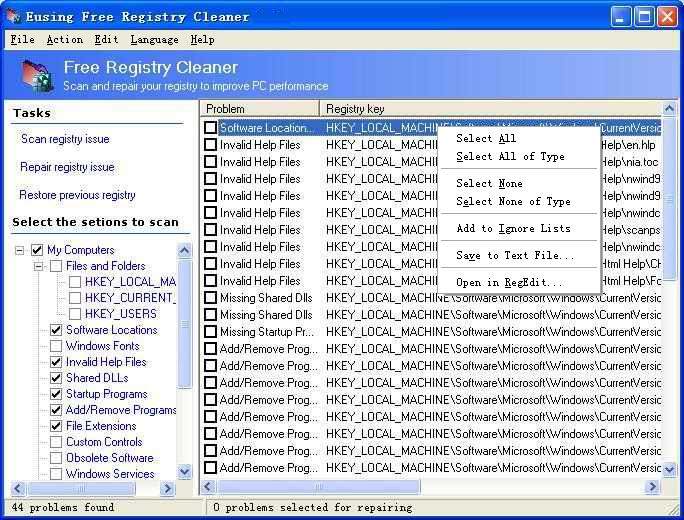
Eusing Free Registry Cleaner ScreenShot
Eusing Free Registry Cleaner is a free registry repair software that allows you to safely clean and repair registry problems with a few simple mouse clicks. The Windows Registry is a crucial part of your PC's operation system.
Problems with the Windows Registry are a common cause of Windows crashes and error messages. Registry problems can occur for many reasons, including references left behind after uninstallation; incorrect removal of software; missing or corrupt hardware drivers; or orphaned start-up programs. This will significantly increase the Registry size and slow down your computer, because Windows will need more time to load, search, and read data from the Registry.
Eusing Free Registry Cleaner will scans your Windows registry for invalid or obsolete information and provide a list of the errors found. After fixing the invalid entries, your system will be more stable and run faster. For maximum safety, Eusing Free Registry Cleaner will make a backup of the repaired entries. You will be able to restore any changes made using the software by choosing Restore registry backup. Eusing Software products are free of spyware and adware.

     Key Features
  • Safely scan your entire Windows registry for invalid or obsolete information
  • A simple, user-friendly interface with which you can safely repair invalid entries in your Windows Registry
  • Make your computer faster by cleaning your Windows registry
  • Improve your Windows PC’s overall performance and stability
  • Find Windows Registry keys left over from deleted files or uninstalled applications
  • The automatic backup creation of the repaired registry entries
  • 100% Spyware FREE, NOT contain any Spyware, Adware or Viruses
      Eusing Free Registry Cleaner will clean up your Registry by finding
  • Missing Shared Dlls
  • Unused File Extension
  • Invalid ActiveX
  • Invalid Help Files
  • Invalid Paths
  • Sound and App Events
  • Obsolete start menu order
  • Invalid Fonts
  • Invalid application paths
  • Invalid startup programs
  • Invalid custom controls
  • Missing Shortcut reference
  • Obsolete Software Key
  • Invalid Installer reference
  • Missing File and Folder
  • And Much More...

Popular posts from this blog

TuneUp360

Most computers encounter the following common problems. When the computer is new, it runs fast at first, then months later it is running very slow. It takes long time to startup, to load websites or run programs. Or you may find that your computer freezes and stops response, or pop up unknown error messages or the programs just becomes dead suddenly. TuneUp360 can auto scan and fix your computer errors with only one click. It is a kind of software which is specially designed for home users and busy people. You won't need to be a computer master. With just one click, you will get a fast, stable and secure computer. You can simply use it to make your computer away from slow, errors and freezes.

JetAudio 8.0.10

Features of JetAudio 8.0.10 Plus VX P Audio CD Ripping Create digital audio files from Audio CD        Conversion Convert various digital audio files to supported target file formats        Recording Record from various analog sources such as microphone or Line-In input        Audio CD burning Create your own Audio CD from digital audio files        Video encoding Convert various digital video files to supported target file formats     30 seconds    MP3/mp3PRO encoding Pack MP3/mp3PRO encoding functions          Special Sound Effect (BBE) Pack Enhanced sound effectors such as BBE and BBE ViVA          Sound Pack Enhanced sound features such as 32 bit output, DRC and Dynamic Limiter          Enhanced Recording Pack Special recording functions such as Silence Detec...

XXClone 0.58.0

The simple way to clone a Windows disk to another disk, makes a self-bootable clone of Windows system disk that supports all 32-bit Windows (95, 98, ME, NT4, 2000, XP), can restore the self-bootability in many cases. It takes only a minute to run and everyone should keep the Freeware handy for just in case. The Pro version is ideal for daily backup, supports common internal disk drives (IDE, SATA, SCSI) and supports external USB/FIREWIRE drives (good for a laptop), competes with Norton Ghost, DriveImage, MaxBlast, much faster than any of them in typical daily backup, need not go to the DOS mode.   Operates in regular Windows environment. Download